AI photo enhancement has quietly become the “secret sauce” behind sharp Instagram feeds, polished ecommerce photos, and even restored family albums. Instead of wrestling with sliders and masks, smart algorithms now clean noise, sharpen details, upscale to 4K or higher, and even resurrect blurry faces in a single click. This article walks through eight of the strongest AI photo enhancers right now, focusing on what they actually do, who they are best for, real pricing, and how users rate them across the web.
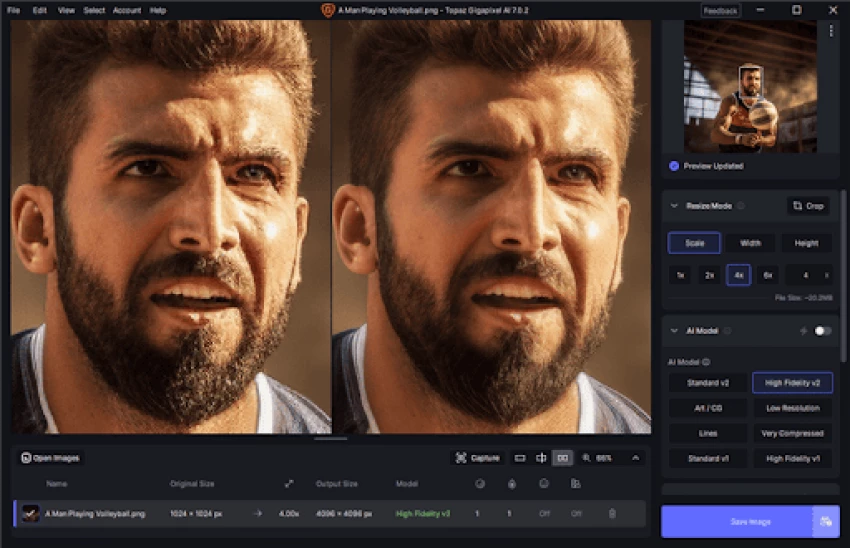
Topaz Photo AI is geared toward serious shooters who care about detail, noise control, and print-level sharpness. It combines Topaz’s sharpening, denoising, and upscaling engines in a single interface and works both standalone and as a plugin for Adobe workflows.
Topaz Photo AI analyzes each image, detects subjects, faces, and noise patterns, then picks an appropriate model automatically. Wildlife, sports, and event photographers often use it to fix slight motion blur, recover detail from high-ISO shots, and enlarge files for large prints without visible artifacts.
● Image quality is its standout: fine textures and edges are preserved even at high levels of denoise.
● The all-in-one workflow replaces juggling separate sharpen/denoise/upscale plugins, which speeds up culling and editing.
● Batch processing makes it attractive for full wedding or event catalogs.
● The shift toward higher-priced subscriptions and bundles has drawn criticism from long-time users.
● Performance depends heavily on GPU and RAM, so older machines can feel sluggish.
● Beginners may find the interface more involved than web-based one-click tools.
| Plan / Model | Price | Notes |
| Monthly subscription | Roughly $39–$58/month (depending on bundle / region) | Includes continuous updates and access to multiple AI modules. |
| Annual subscription | Approximately $199–$252/year | Marketed as better value than paying month-to-month. |
| Free trial | $0 | Full-quality export for a limited period before purchase. |
| Platform | Rating | Notes |
| G2 (Topaz Photo AI / Topaz Labs) | around 4.5/5 in recent reviews | Users highlight quality; lower scores usually mention cost. |
| Photography review sites | Often scored 4–4.5/5 | Reviewers call it among the best for noise + sharpening. |
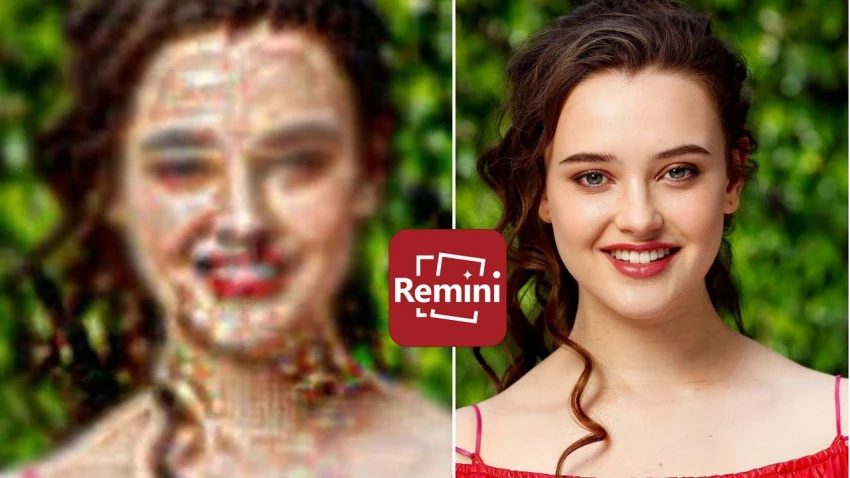
Remini concentrates on portraits and photo restoration, especially through its mobile apps. It is widely used to “rescue” selfies, old prints, and low-resolution screenshots by reconstructing facial details in a single tap.
The app sends images to the cloud, runs them through specialized face-enhancement models, and returns a much sharper version. For old family albums, scanned prints, or tiny social media profile photos, Remini can make eyes, hair, and skin appear significantly clearer without manual retouching.
● Very minimal learning curve: the main workflows are essentially one button.
● Great at turning heavily compressed or low-res portraits into usable images for sharing and printing.
● The free tier allows experimentation before committing to a paid plan.
● Weekly subscription pricing can outpace typical monthly SaaS costs if used for long periods.
● On some photos, facial features can look overly “polished” or slightly artificial if enhancement is pushed too hard.
● Trustpilot reviews show recurring complaints around billing and difficulty cancelling subscriptions.
| Plan | Price | What you get |
| Free | $0 (ad-supported, daily caps) | Limited number of enhancements, possible watermarks and slower processing. |
| Personal | About $6.99/week | Higher usage limits, better output options, fewer restrictions. |
| Business | Around $9.99/week | Larger quotas, bulk processing, and usage aimed at commercial needs. |
| Longer-term plans | Monthly / annual | Effective weekly price drops substantially with yearly billing. |
| Platform | Rating | Notes |
| App Store – Remini AI Photo Enhancer | Roughly 4.6/5 from 335K+ ratings (US) | Users praise output; some negative reviews mention ads and subscriptions. |
| App Store – iPad listing | Around 4.6/5 from 20K+ ratings | Similar sentiment to the iPhone version. |
| Trustpilot – remini.ai | Mixed, with many low-star reviews related to payment and support | Reinforces the need to manage subscriptions carefully. |
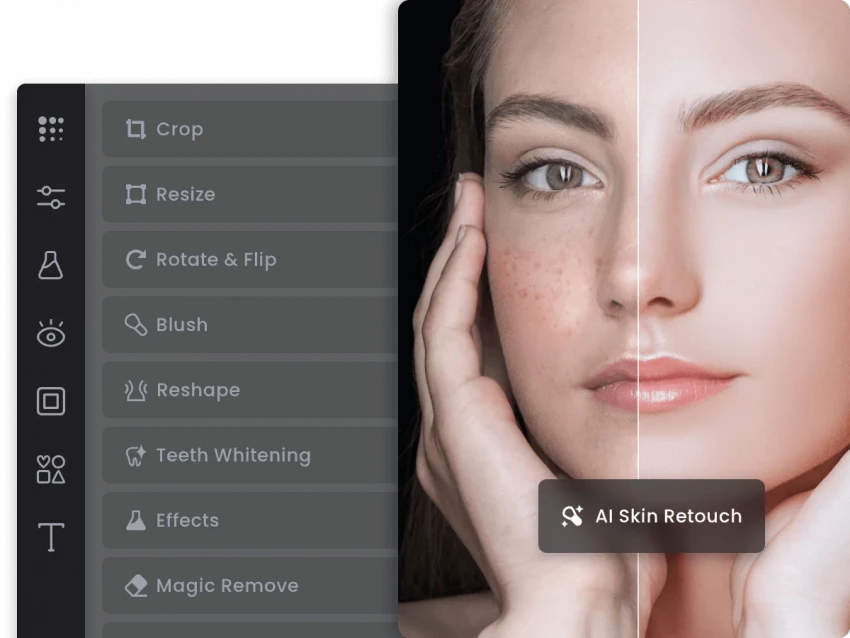
Fotor combines AI-powered enhancement with templates, filters, and even AI image generation, making it a hybrid of photo editor and lightweight design tool. It is aimed at creators who want to “fix and format” photos in one place without learning complex software.
Fotor’s AI modules can clean noise, adjust colors, fix exposure, and upscale images to higher resolutions. It handles basic touch-ups for portraits and landscapes, supports batch editing, and layers in features like background removal, filters, and AI effects.
● Interface is straightforward, which makes it approachable for non-professional users and social media creators.
● Combining enhancement tools with templates and basic graphic design makes it a flexible “all-in-one” environment.
● Offers both web and app access, so edits can continue across devices.
● Most of the more advanced AI functions, plus high-res exports, sit behind Pro and Pro+ paywalls.
● Not as granular or precise for high-end retouching compared with specialist tools.
● Heavy batch work or very large files can cause slowdowns.
| Plan | Price | Notes |
| Basic | Free | Core editing and enhancement, but some restrictions on AI and assets. |
| Fotor Pro | $8.99/month | Unlocks advanced AI tools, HD export, and a broader template library. |
| Fotor Pro+ | $19.99/month | Adds commercial stock assets, brand features, and extra storage. |
| Platform | Rating | Notes |
| G2 – Fotor Photo Editor | Commonly around 4.3–4.5/5 in recent data | Users highlight its simplicity and value for casual use. |
| GetApp / Capterra | Generally mid-to-high 4/5 range | Seen as a good fit for non-professional creators. |
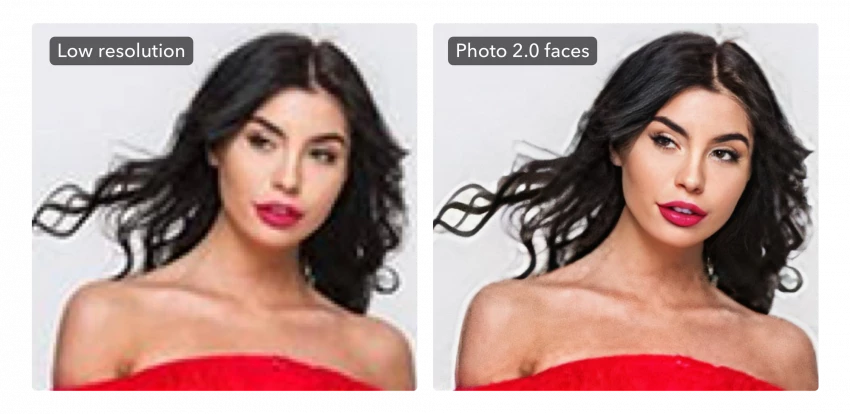
LetsEnhance.io specializes in upscaling and quality restoration for images used across web, print, and ecommerce. Rather than being a full editor, it focuses almost entirely on making small or compressed images look clean at larger sizes.
The service offers models tuned for different content types, such as product photos, portraits, digital art, and highly compressed web images. It can push resolution up to hundreds of megapixels (around 512 MP) for large-format printing or high-density displays while maintaining crisp edges and realistic textures.
● Produces high-quality enlargements that often outperform generic resize tools and standard editors.
● Presets for ecommerce, prints, and general web use simplify decisions for non-technical teams.
● Batch processing and an API make it attractive for agencies and online stores processing many images.
● Does not replace a full local editor; it is best used alongside other tools.
● Credit-based plans mean heavy users need higher tiers or custom arrangements.
● Manual retouching and creative editing options are minimal.
| Model | Price | Notes |
| Free tier | $0 | Limited number of images and output resolutions. |
| Monthly subscriptions | Typically start in the ~$9–$15/month band | Include a set number of image credits for upscales. |
| One-off bundles | Variable | Packs of credits for occasional or project-based use. |
| Platform | Rating | Notes |
| Software review platforms | Often reported around 4.5/5 in recent guides | Users emphasize the upscaling quality and easy interface. |
| Creator blogs | Frequently recommended as a go-to online upscaler | Often mentioned alongside Topaz when quality is the priority. |
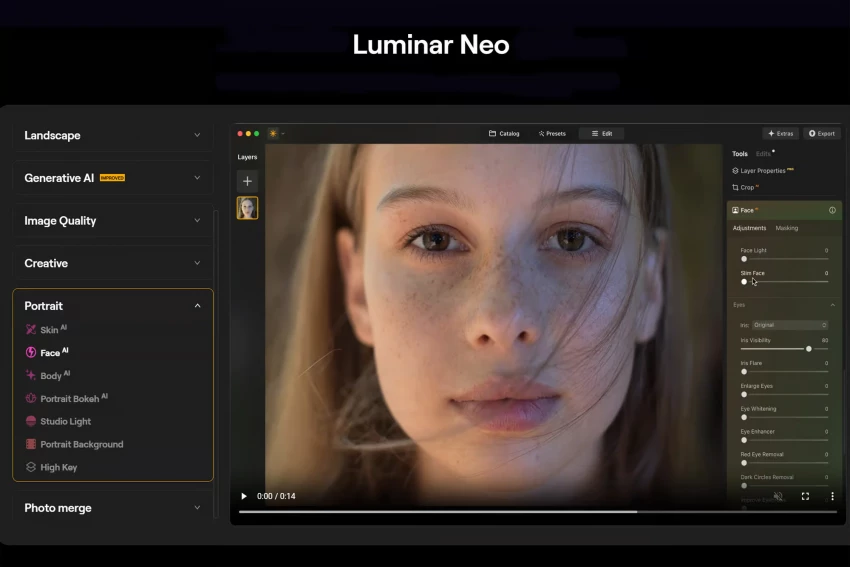
Luminar Neo is a creative photo editor that leans heavily on AI but still supports a more traditional editing flow. It is positioned as an alternative to Photoshop and Lightroom for photographers who want automation plus artistic control.
Luminar Neo includes dedicated tools for relighting scenes, enhancing structure, retouching faces and skin, and replacing skies. Editors can stack these AI adjustments, save looks, and manually refine masks, which gives much more control than one-click enhancers.
● Relight AI helps balance tricky lighting and add depth, which is difficult to do manually.
● Portrait tools can subtly clean skin and enhance eyes while still looking natural when used moderately.
● Photographers who enjoy stylized or cinematic aesthetics get a broad set of creative controls built on AI.
● Hardware requirements are non-trivial, and performance complaints show up in some reviews.
● Certain generative features and extras may require specific bundles, subscriptions, or third-party platforms like Setapp.
● The interface, while friendlier than Photoshop, still has a learning curve compared to pure auto enhancers.
| Plan | Price | Notes |
| Perpetual desktop license | From around $119 | One-time purchase for a single device or OS. |
| Cross-device perpetual | About $159 | License that covers multiple devices. |
| Setapp subscription | From $9.99/month on Mac | Access Luminar Neo as part of Setapp (some features may differ). |
| Platform | Rating | Notes |
| Aggregated software review sites | Commonly in the 4.3–4.6/5 band | Users like the AI tools; slower performance is the main criticism. |
| Photography blogs | Often positioned as a top AI-driven editing alternative | Strong praise for Relight and portrait modules. |
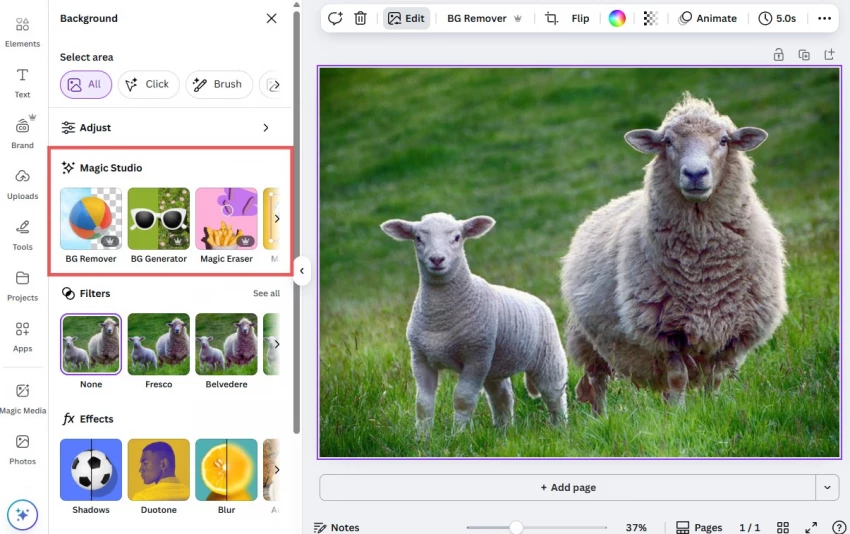
Canva is best known as a design platform, but its integrated AI photo tools cover many day-to-day enhancement tasks. Teams already building social posts, ads, and presentations in Canva can tweak photos without leaving the canvas.
Canva’s editor provides auto-adjust features for exposure and color, background removal, object cleanup via magic eraser, and generative fill-style tools. These functions are integrated directly into layouts, so assets can be enhanced and dropped into templates in one flow.
● Streamlines the entire content process for marketers: photos get fixed and placed in designs in the same workspace.
● Template library, brand kits, and collaboration tools make it easy for teams to maintain consistency.
● Browser-based, so it works across most machines without installations.
● Not designed for pixel-level retouching or professional-grade color work.
● The best AI features require Canva Pro or higher, which adds subscription cost.
● Fine control over enhancement is limited compared with dedicated photo software.
| Plan | Price | Notes |
| Free | $0 | Basic editor and a limited subset of AI and templates. |
| Canva Pro | Around $18/month | Full template catalog, background remover, extra AI credits. |
| Teams tiers | Higher, per-seat pricing | Add collaboration, approvals, and brand management. |
| Platform | Rating | Notes |
| Major review sites | Frequently around 4.7–4.8/5 overall | Ratings reflect design + editor; AI tools are part of that package. |
| Mobile app stores | Often above 4.5/5 | Popular among social media managers and small businesses. |
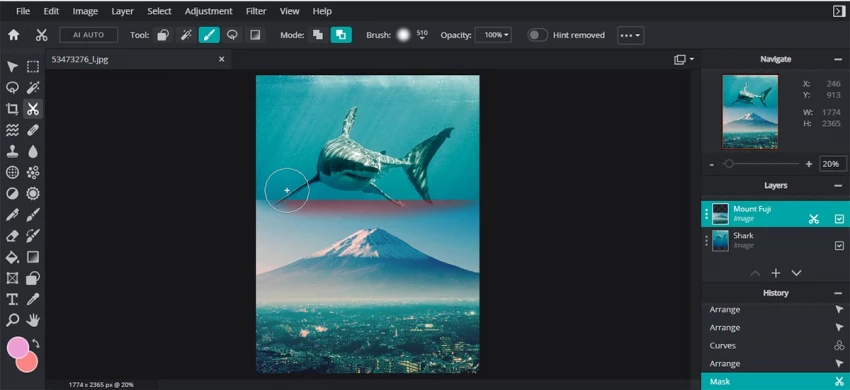
Pixlr is a browser-first editor that focuses on speed and affordability, with a growing stack of AI tricks. It targets casual creators, students, and small businesses who want quick edits and simple graphics without installing bulky software.
Within Pixlr, users can run auto-enhance, strip backgrounds, apply filters, and use generative fill powered by AI. The editor supports layers and basic compositing, so images can be enhanced and combined into social graphics or thumbnails in one interface.
● Very light to run: it works in most browsers, including on lower-spec machines.
● Entry-level plans are among the most budget-friendly in this list.
● Learning curve is gentle, making it suitable for students and non-designers.
● Free tier imposes restrictions on AI usage and the number of high-quality exports per day.
● Does not offer the depth that professionals expect for color grading or advanced masking.
● Ads and upsell prompts can disrupt the experience on lower-tier plans.
| Plan | Price | Notes |
| Free | $0 | Core editor plus limited daily AI credits and exports. |
| Plus | From about $2.49/month | Expanded AI credits, unlimited saves, and removal of most ads. |
| Higher bundles | Around $9.99/month in some offers | More templates, assets, and higher AI quotas. |
| Platform | Rating | Notes |
| SaaS review sites | Usually in the 4.2–4.5/5 range | Commended for price-performance balance. |
| App stores | Mid-to-high 4/5 | Considered handy for quick on-the-go edits. |
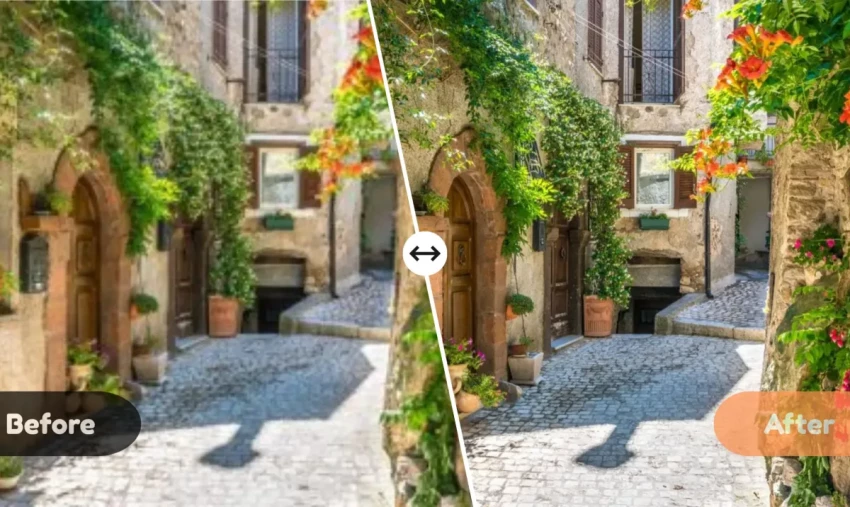
AIEnhancer is a web-based tool positioned as a general-purpose AI photo enhancer with editing options on top. It focuses on clarity and natural detail for a broad mix of photos, from portraits to products.
Uploads go through enhancement models that adjust sharpness, noise, and color in a single pass. Instead of pushing extreme smoothing or ultra-aggressive sharpening, the emphasis is on subtle improvements that preserve realistic textures and skin.
● Produces clean, natural-looking improvements that work well for everyday content and business imagery.
● The interface is straightforward enough that non-technical users can get results quickly.
● Free access allows experimentation, with paid tiers waiting only when volume or resolution needs increase.
● Purely web-based, so there is no deep integration into desktop software ecosystems.
● As a newer platform, it has fewer niche tools than veteran products like Topaz or Luminar.
● Long-term user data and large-scale community feedback are still building.
| Plan | Price | Notes |
| Free | $0 | Basic enhancement for a limited number of images or resolutions. |
| Paid tiers | Tiered pricing (varies with current offers) | Unlock higher resolutions, larger monthly limits, and extra editing tools. |
| Source | Rating / Sentiment | Notes |
| 2026 AIEnhancer guides | Frequently highlighted as “best overall AI photo enhancer & editor” | Praised for balancing quality with ease of use. |
| Early adopter reviews | Generally positive on clarity and speed | Fewer long-term benchmarks compared with legacy tools. |
| Tool | Ideal user | Core enhancement angle | Entry pricing snapshot |
| Topaz Photo AI | Serious photographers | High-end noise reduction, sharpening, and upscaling | Around $39–$58/month or ~$199–$252/year. |
| Remini | Portrait and family photo users | Face reconstruction and restoration | Free; paid from about $6.99/week. |
| Fotor | New creators, social users | Simple AI fixes plus templates | Free; Pro at $8.99/month; Pro+ at $19.99/month. |
| LetsEnhance.io | Ecommerce and print workflows | High-quality upscaling and cleanup | Free tier; paid from low double-digit $/month. |
| Luminar Neo | Creative photographers | AI relighting, portraits, stylized edits | Perpetual licenses from ~$119. |
| Canva | Marketers and teams | In-design enhancement + templates | Free; Pro from about $18/month. |
| Pixlr | Students and small creators | Fast browser-based edits | Free; Plus from ~$2.49/month. |
| AIEnhancer | General users & SMBs | Natural-looking one-click enhancement | Free tier plus variable paid tiers. |
Choosing an AI photo enhancer becomes easier when the main use case is clear. For pure quality on difficult files, Topaz Photo AI or LetsEnhance.io are strong fits, whereas fast portrait fixes lean toward Remini or Fotor, and social-first workflows often favor Canva or Pixlr.
Budget also plays a big role: subscriptions like Remini’s weekly plans add up quickly, while Fotor, Pixlr, and Canva Pro offer broader value across many content tasks. For readers who prefer to avoid long-term subscriptions, Luminar Neo’s one-time license and AIEnhancer’s flexible online plans can be practical middle grounds.
When I sat down to seriously compare InVideo and Pictory, I wasn’t just testing...
Grace Howard5 months ago

AI background removal has quietly become the “first edit” step for almost every...
Benjamin Clark5 months ago

Looking Beyond Canva: What Are You Really Missing?Canva is brilliant for getting...
Grace Howard5 months ago

A few years ago, “chatbot” meant a rigid decision tree that collapsed as soon as...
Benjamin Clark5 months ago
ElevenLabs has set a high bar for lifelike AI voice generation, but it’s no long...
Grace Howard5 months ago

AI is no longer a “nice-to-have” for YouTube creators, it’s the engine that lets...
Alexander Hughes5 months ago
Discussion