
AI background removal has quietly become the “first edit” step for almost every visual you see online, from Amazon listings to LinkedIn profile photos. With e‑commerce, social content, and ad creatives exploding, the global image editing software market is projected to keep growing fast, and AI background removers are now doing in seconds what used to take designers minutes per image.
In this guide, you will find eight of the best AI tools for background removal right now, with a practical look at what each one does well, where it falls short, what it costs to start using and who it’s best for.

Flonnect has positioned itself as an all‑in‑one background remover that doesn’t just cut out subjects but supports a full workflow: removal, background generation, and image enhancement in one place. It’s particularly attractive for creators and small businesses because it offers truly unlimited free background removal with no watermarks, which is rare in this category.
Feature‑wise, Flonnect uses AI to detect subjects, edges and tricky areas and gives you quick transparent exports or lets you swap backgrounds and create marketing‑ready visuals in a few seconds. It’s built for non‑designers, so the interface is simple, yet the outputs are clean enough for product photos, social posts, and ad creatives.
Flonnect is especially strong where you need volume plus speed: for example, one case study from their own content mentions a Shopify seller cleaning 200 product photos in under an hour and then improving conversion rates by 34% after switching to clean studio‑style backgrounds. However, because it’s a browser‑based solution, heavy professional studios that need very granular masking control may still want to pair it with Photoshop for final polish.
Starting pricing: Flonnect’s AI background remover is free to use with unlimited background removals.
Best for: Marketers, e‑commerce sellers, and content creators who want unlimited free background removal plus quick background swapping without learning complex software.
Rating & user voice
Flonnect as a company holds a 3.8 out of 5 rating on Trustpilot, where users highlight its usefulness and simplicity for daily tasks.
One Trustpilot reviewer writes that Flonnect “offers an incredibly user‑friendly experience, making it simple for anyone to use… I highly recommend it for hassle-free and feature-rich screen recording,” indicating that users value its ease of use and broad feature set across its tools.

remove.bg is arguably the most recognizable name in AI background removal and has become a go‑to “upload and done” solution for people who just want the background gone in about five seconds. It supports web, desktop, and plugins with a strong API, so teams can slot it into Photoshop, Zapier, CMSs, CLIs, and more, making it feel like infrastructure rather than a standalone toy.
Its core strength is consistency and speed: one‑click removal with relatively clean edges, batch processing for large sets of images, and HD exports that are good enough for professional use. For developers and bigger stores, the API and integrations are a major plus because you can automate background removal in existing pipelines instead of manually uploading images.
On the flip side, remove.bg can get expensive for high‑volume users because the pricing is credit‑based, and some users report that unused credits don’t always roll over the way they expect after upgrading and downgrading plans. There are also occasional complaints when backgrounds are very similar to the subject color, which can confuse the AI and require manual clean‑up.
Starting pricing: remove.bg offers low‑resolution previews for free; paid access starts from around 8–9 USD per month with credit‑based plans and API tiers.
Best for: E‑commerce stores, agencies, and developers who want fast, reliable background removal with strong API and plugin support.
Rating & user voice:
On Capterra, remove.bg is listed with a rating of 4.6 out of 5, reflecting strong overall satisfaction with quality and performance.
A G2 user review sums up the experience: “Quality of their background removal is excellent. The API is reliable,” while also warning buyers to “be very cautious about their pricing model and the credit system” due to rollover limitations.
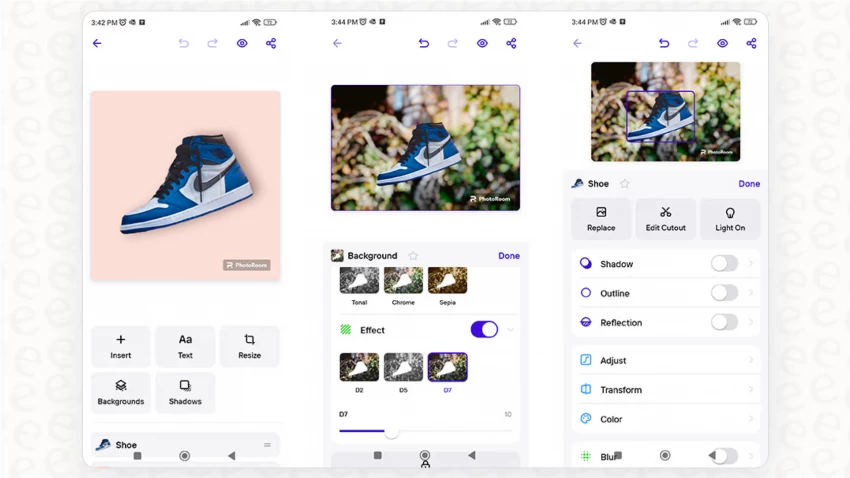
Photoroom is built from the ground up for product photos and marketplace images, with a mobile‑first approach that makes it easy for sellers to produce “studio” shots straight from their phones. Beyond simple cutouts, it adds templates, shadows, and ready‑made compositions tailored for platforms like Amazon, Etsy, and social channels.
In tests and independent comparisons, Photoroom scores very high on edge quality, especially around hair and fur, and also performs well on transparent objects, which are historically difficult for background removers. Its workflow is optimized for non‑designers: upload or snap a picture, background is removed in seconds, then you can drop the subject into branded templates or curated scenes.
The trade‑offs: the free version typically adds watermarks to downloaded images, and advanced features require a subscription. Professional designers sometimes feel it lacks the fine‑grained control of full desktop tools, so it’s more of a fast content engine than a high‑end compositing environment.
Starting pricing: Photoroom provides a free tier with watermarks; paid plans start from about 2.99 USD per month for individuals, plus separate API pricing for higher‑volume or developer use.
Best for: Marketplace sellers and small businesses needing quick, polished product photos and social graphics without hiring a designer.
Rating & user voice:
On G2, Photoroom is rated 4.3 out of 5, with users praising its balance of ease of use and output quality.
One G2 reviewer notes: “Upload photo and background is automatically removed. The image can then be edited, backgrounds added, text added and other images added,” while pointing out that watermarked downloads and subscription‑only advanced features are the main downsides.
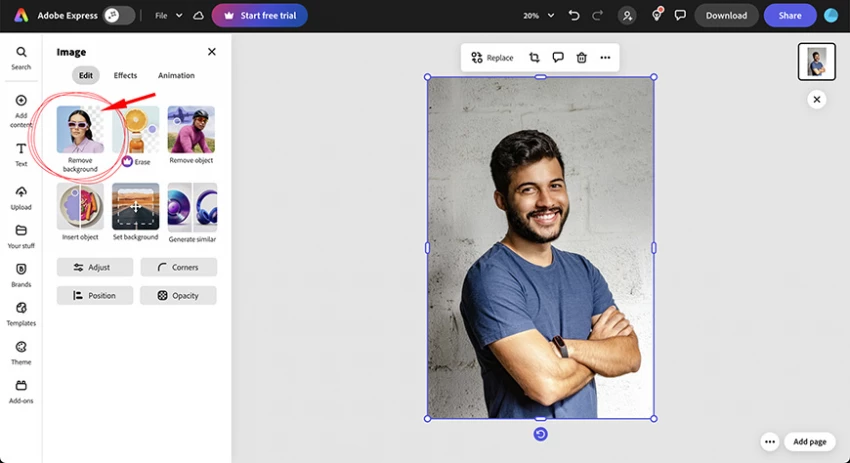
Adobe Express (formerly Adobe Spark) brings Adobe’s AI capabilities into a simplified web and mobile design tool that includes a solid background remover. Instead of being just a cutout tool, it lets you remove backgrounds and immediately continue designing social posts, ads, and web graphics in the same interface, using templates and brand kits.
The key benefit of Adobe Express is integration with the Adobe ecosystem and a deep template library. For users already in Photoshop or Illustrator, it provides a lighter, faster option for everyday content where you want AI‑powered removal but don’t need full desktop complexity.
However, compared to dedicated tools, the background remover isn’t always the absolute best in tricky edge cases, and the free plan has limited features, so you will usually need the paid version for regular, brand‑heavy use. Some users also find the learning curve slightly steeper than ultra‑simple one‑page tools, simply because Adobe Express does more than just background removal.
Starting pricing: Adobe Express offers a free plan with limited functionality; paid plans start from about 9.99 USD per month, unlocking more templates, branding, and export options.
Best for: Marketers and designers who want an integrated design environment with background removal built in, especially teams already using Adobe products.
Rating & user voice:
Adobe Express carries an approximate rating of 4.5 out of 5 on G2, reflecting strong satisfaction with its overall design capabilities and integrated tools like background removal. While individual reviews vary, many users highlight that it strikes a good balance between power and accessibility for non‑experts.
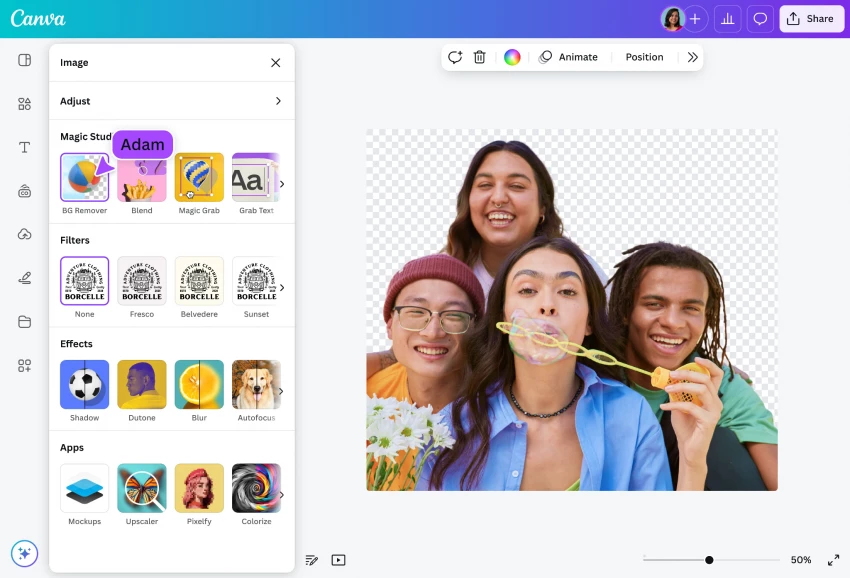
Canva is not marketed as a “background remover” first, yet its built‑in AI background removal is one of the most widely used because it sits directly inside a drag‑and‑drop design canvas. Users creating social media graphics, presentations, thumbnails, and basic marketing assets can remove backgrounds from photos and drop them straight into templates, without opening any other tool.
The strength of Canva’s remover is convenience: it’s good enough for most web and social use cases and dramatically reduces the need for manual pixel‑by‑pixel editing. Combined with stock photos, brand kits, and pre‑made layouts, background removal becomes just one step in a complete design workflow that non‑designers can manage.
There are trade‑offs. Background removal is typically locked to Canva Pro, so free users must upgrade to unlock it consistently, and its precision may lag behind specialist tools for extremely complex edges or hair. Some creators also mention that it can struggle with cluttered backgrounds and sometimes requires manual tweaks or additional passes.
Starting pricing: Canva itself has a generous free plan, but the background remover is part of Canva Pro, which starts at roughly 15 USD per month for individuals (pricing varies by region and plan).
Best for: Content creators, social media managers, and small businesses who need graphics, not just cutouts, and prefer an all‑in‑one design environment.
Rating & user voice:
Canva holds a 4.7 out of 5 star rating on G2 across thousands of verified reviews, with users repeatedly praising time saved by AI tools like background removal.
One G2 review captures the sentiment: “Countless hours are required to learn complex software, manually pick pixels, remove backgrounds… Canva makes this process far more accessible for non‑designers.
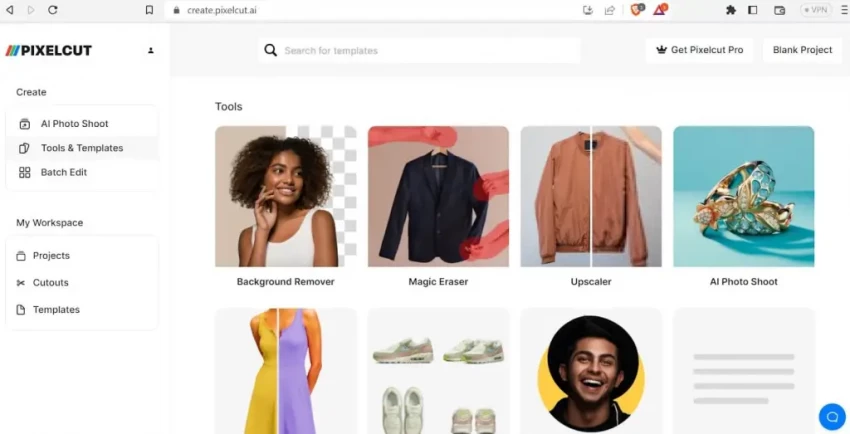
Pixelcut focuses on mobile creators and solopreneurs, bringing AI background removal and quick product‑style layouts into a smartphone‑friendly package. It offers a simple interface where you can remove backgrounds, add shadows, and build social or product visuals on the go, making it particularly appealing for Instagram sellers and side‑hustle store owners.
What sets Pixelcut apart is how quickly you can go from a raw phone shot to a polished, platform‑ready image, with features like templates, text overlays, and batch background removal for multiple products. It aims squarely at non‑technical users who want professional‑looking results without needing desktop software.
Limitations include its focus on mobile, which may not satisfy teams that prefer desktop‑centric workflows, and the fact that some advanced features and higher resolution exports sit behind paid tiers. Being a younger ecosystem compared to Adobe or Canva, it also has fewer integrations into broader creative stacks.
Starting pricing: Pixelcut offers a free tier with background removal and limited usage; Pro plans start at roughly 9.99–10 USD per month, with additional features and higher limits.
Best for: Mobile‑first creators, small online sellers, and influencers who mainly work from their phones and want quick, good‑looking cutouts for social and store listings.
Rating & user voice:
Pixelcut is rated around 4.7 out of 5 on Trustpilot, where users praise its ease of use and quality for quick background removal tasks. Separate but similar tools like PixelCutout show how users describe this type of solution: “One click and the background is gone. Love it! … Clean cutouts in seconds,” capturing the typical user experience with these mobile‑optimized removers.
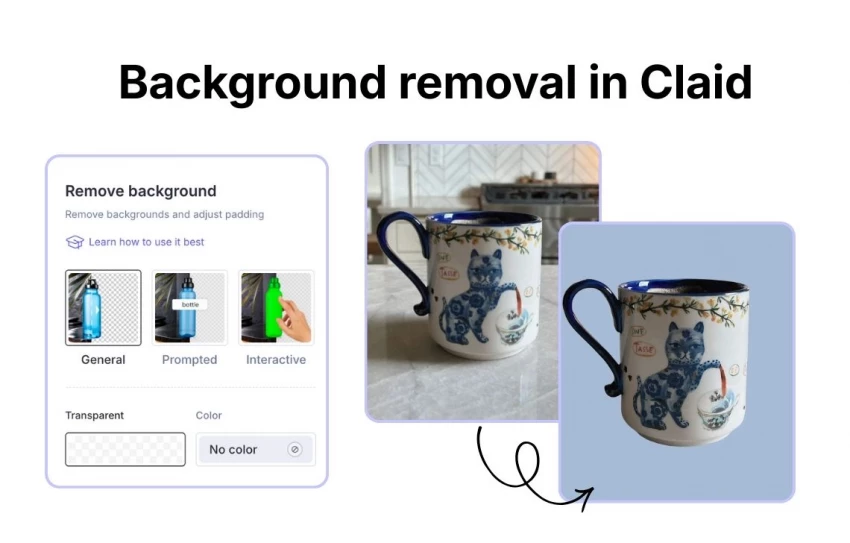
Claid is built for serious e‑commerce and product photography workflows, especially where you need background removal plus additional AI operations such as upscaling, enhancement, or full generation pipelines. Instead of being just a web app, it is often used as an API‑first solution integrated into platforms and batch workflows.
Its standout strength is combining cutouts with product‑ready output: you can standardize lighting, backgrounds, and image quality at scale, which matters if you’re processing thousands of SKUs. Claid also offers strong automation options for developers, letting them build workflows that automatically remove backgrounds, enhance images, and prepare them for marketplaces without manual intervention.
The flip side is that casual users might find Claid overkill if they just need the occasional background removed, and its pricing can be more oriented toward businesses than individual creators. Setup and integration require a bit more technical familiarity compared to simple upload‑and‑download tools.
Starting pricing: Claid typically offers web plans plus API credits; there may be trials, but ongoing use generally follows a subscription or credit model rather than a purely free offering.
Best for: E‑commerce companies, SaaS platforms, and teams that need scalable, automated background removal and enhancement, especially via API.
Rating & user voice:
Claid is highlighted in several industry comparisons as a top option for product photos at scale, with a Capterra rating around 4.8 out of 5 mentioned in broader background‑remover roundups. Users often emphasize the combination of background removal and full product‑image workflows rather than just raw cutout quality.
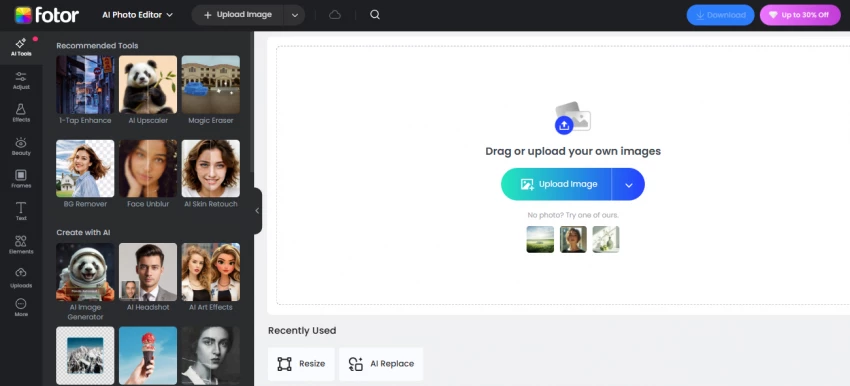
Fotor combines AI background removal with a broader set of photo editing tools, making it a good entry point for beginners who want more than just a cutout but aren’t ready for heavy professional software. It runs on web and mobile, and the background remover is tightly integrated with filters, retouching, and basic design features.
The main strength is convenience for casual creators: you can remove a background, adjust colors, add text, and export social‑ready images inside one interface, which is friendly for users who are new to editing. It’s positioned as a complete editing suite, so background removal becomes just one step in a simple workflow, ideal for bloggers, social media users, or small shops doing light editing.
Limitations include slightly lower ratings than some specialist tools and other suites, plus fewer advanced design features compared to Canva or Adobe Express. In some independent reviews, its edge handling and precision aren’t rated as highly as dedicated background‑removal platforms, though they’re generally considered good enough for everyday use.
Starting pricing: Fotor offers a free version with basic features; paid plans start around 8.99 USD per month, unlocking more tools and higher‑quality exports.
Best for: Beginners and casual users who want an easy photo editor with built‑in background removal, primarily for social content and simple graphics.
Rating & user voice:
On G2, Fotor has a rating of about 4.3 out of 5, reflecting generally positive user sentiment with some room for improvement compared to top‑tier competitors.
Reviews often describe it as easy to use and “good enough” for quick edits, with some users later upgrading to more advanced tools once their needs grow.
| Tool | Best For | Starting Pricing (approx.) | Notable Rating Source |
| Flonnect | All‑in‑one, unlimited free background removal | Free, unlimited removals | 3.8 / 5 on Trustpilot |
| remove.bg | Fast one‑click removal + API | From ~8–9 USD/month | 4.6 / 5 on Capterra |
| Photoroom | Product photos & marketplace images | From ~2.99 USD/month | 4.3 / 5 on G2 |
| Adobe Express | Integrated design + removal | From ~9.99 USD/month | ~4.5 / 5 on G2 |
| Canva | General design with built‑in remover | Pro from ~15 USD/month | 4.7 / 5 on G2 |
| Pixelcut | Mobile‑first creators | From ~9.99–10 USD/month | 4.7 / 5 on Trustpilot |
| Claid | E‑commerce at scale with API | Web + API credits | ~4.8 / 5 (Capterra‑style) |
| Fotor | Beginners needing editor + remover | From ~8.99 USD/month | 4.3 / 5 on G2 |
There’s no single winner here, just the right tool for each type of creator. Flonnect is your best bet if you want unlimited, watermark‑free background removal without paying upfront, while remove.bg is the safer choice when reliability, API access, and automation matter more than raw cost.
If you care about designing full social posts and ads around your cutouts, Canva and Adobe Express are the most practical “all‑in‑one” options. Photoroom and Pixelcut are ideal for product‑focused and mobile‑first workflows, Claid is built for serious e‑commerce scale, and Fotor is a friendly starter tool if you’re just getting into editing and need something simple that works.
When I sat down to seriously compare InVideo and Pictory, I wasn’t just testing...
Grace Howard5 months ago

AI photo enhancement has quietly become the “secret sauce” behind sharp Instagra...
Funke Ogunleye5 months ago

Looking Beyond Canva: What Are You Really Missing?Canva is brilliant for getting...
Grace Howard5 months ago

A few years ago, “chatbot” meant a rigid decision tree that collapsed as soon as...
Benjamin Clark5 months ago

ElevenLabs has set a high bar for lifelike AI voice generation, but it’s no long...
Grace Howard5 months ago

AI is no longer a “nice-to-have” for YouTube creators, it’s the engine that lets...
Alexander Hughes5 months ago
Discussion