Key Takeaways:
● It’s Not Always the Copy: Dropping open rates are often caused by technical email deliverability issues rather than bad subject lines.
● Trust is Mandatory: Google, Yahoo, and Microsoft now require SPF, DKIM, and DMARC authentication for bulk and high-volume senders.
● Reputation Matters: High bounce rates and unauthenticated domains act like a "bad credit score," which causes providers to bypass your inbox and send you straight to spam.
● Clarity Wins: Human error, like "reply-all" fatigue and vague requests, causes recipients to intentionally ignore the emails that actually make it through.
● The Fix: Audit your DNS records, move toward a DMARC p=reject policy, and keep your email lists clean to maintain long-term sender trust.
If your email open rates are plummeting, your audience isn't necessarily ignoring you; they might not even know you reached out. While most marketers spend hours obsessing over subject lines and CTA buttons, the harsh reality is that email deliverability often has nothing to do with your copy and everything to do with your technical “digital handshake.”
Every day, over 112 billion business emails are sent globally. With the average person handling roughly 122 messages daily, recipients are actively looking for reasons to ignore anything that doesn't immediately demand their attention. Today, reaching the inbox is a matter of trust. If major providers don’t recognize your domain as verified, or if your message structure is poor, you’re headed straight for the junk folder or the trash bin.
This is exactly why tools like PowerDMARC have become essential for modern email strategy. By automating complex authentication protocols like DMARC, SPF, and DKIM, PowerDMARC handles that crucial digital handshake for you. It stops spoofing, proves to inbox providers that you are exactly who you say you are, and ensures your carefully crafted messages actually land where they belong: right in front of your audience.
When engagement metrics drop, the instinct is to "fix the content" by rewriting the hook or changing the CTA color. However, the problem usually falls into one of two categories: either the email never arrived in the first place, or it was so poorly constructed that the recipient intentionally bypassed it to save time.
● Emails are landing in spam (not being ignored): Many people think they're being "ghosted" when, in reality, their technical "ID" doesn't match what the inbox provider expects. If your authentication records are missing or messy, receiving servers will filter your mail out before a human ever gets the chance to see it. You aren't being ignored; you’re being invisible.
● Your domain reputation has dropped without you noticing: Think of your domain reputation like a credit score. Every time you send to a "dead" email address or get flagged as spam, your score takes a hit. If that score drops too low, even your most important one-on-one business emails will start heading to the junk folder because providers no longer view your domain as a "safe" sender.
● Silent filtering by major providers: Modern filters from Gmail and Outlook have become incredibly sophisticated. Instead of sending you a "Bounce" notification, they may simply "silently discard" unauthenticated mail or throttle your delivery so it arrives three days late. If your SPF and DKIM aren't aligned, you might be getting filtered out by an AI guardian you didn't even know was watching.
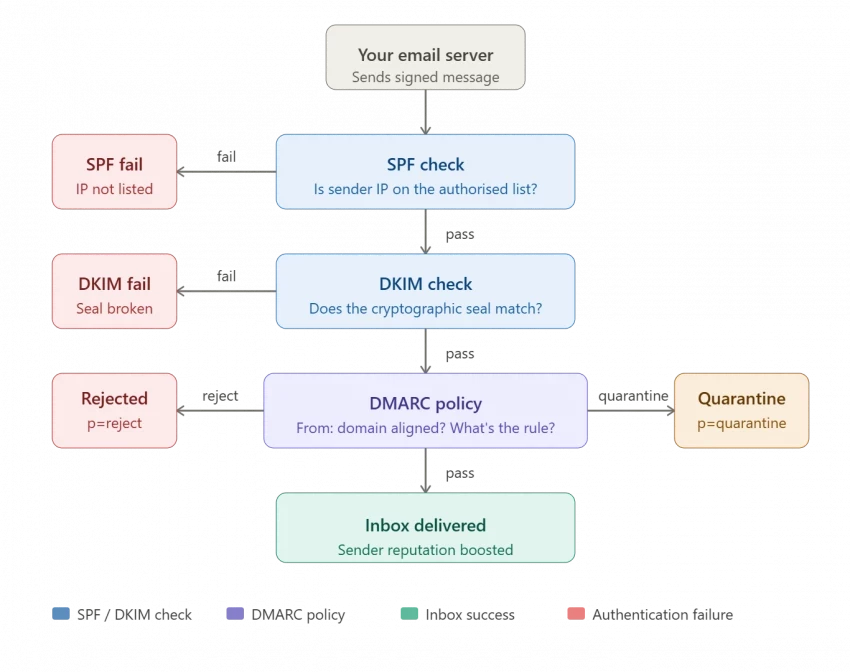
In the simplest terms, email authentication is the process of proving that an email is actually from who it says it’s from. It is the difference between a hand-written note on a napkin and a notarized document. To improve email deliverability, you must master three core protocols that act as your digital ID card. Without them, you’re essentially sending mail without a return address or a stamp.
Think of SPF as a "VIP guest list" for your domain. It is a text record in your DNS that explicitly lists every IP address, server, or third-party service that has your permission to send mail on your behalf. When your email arrives, the receiving server checks this list. If the sender isn’t on it, the email is immediately viewed as a "gatecrasher" and is likely turned away or sent straight to the spam folder.
While SPF checks who sent the mail, DKIM checks the integrity of the mail itself. DKIM adds a cryptographic digital signature, essentially a tamper-proof "seal", to the header of your emails. This seal ensures that the message hasn't been intercepted or altered by a middleman while traveling across the internet. If the seal is broken or doesn't match, the receiving server knows the message has been compromised and will treat it as a security threat.
DMARC is the "instruction manual" that ties everything together. It tells receiving servers exactly what to do if the SPF or DKIM checks fail. Without a DMARC policy, a server might not know whether to take a risk on a failing email or block it entirely. DMARC allows you to set a clear rule: "If the authentication fails, reject the email."
Beyond just enforcement, DMARC provides you with aggregate reports and visibility into every single person or tool using your domain to send mail. This allows you to spot hackers trying to spoof your brand before they can do real damage to your reputation.
You don’t need to be a career IT expert to spot email delivery issues. Honestly, if you’ve been in the game for a while, you can usually feel when something is off, kind of like knowing your car needs an oil change just by the sound of the engine. Keep an eye out for these red flags:
● Sudden Engagement Drops: If your open rates fall by 20% overnight, it’s almost certainly a technical delivery problem rather than a creative one. You don't just lose your ability to write good copy in 24 hours; what happened is that a major provider likely blacklisted your IP or flagged your domain.
● DMARC Failure Alerts: If you start receiving DMARC RUF reports, it means your legitimate tools, like your billing software or CRM, are being rejected. This is a massive "check engine" light for your domain security that you shouldn't ignore if you want to keep your communications flowing.
● The "Spam Test" Failure: If a quick test email sent to your personal Gmail or Outlook account lands in the "Junk" folder, your sender reputation is officially at risk. It’s a reality check that tells you the algorithms now view your brand with a side of skepticism, regardless of how much your customers actually like you.
● The Silent Treatment: When clients or partners consistently report "never seeing" your messages, your mail has likely hit a corporate firewall or a silent spam filter. It’s incredibly frustrating to realize you’ve been talking to a brick wall for a week just because a technical record was misconfigured on the backend.
Fixing your current authentication records is a great start, but long-term inbox placement is about consistently signaling that your domain is trustworthy. Here is how to build and protect that reputation over time:
1. Move DMARC to p=reject: Once you’ve confirmed that all your legitimate senders are passing authentication checks, move your DMARC policy to p=reject. This signals to major inbox providers that your domain is actively managed and fully protected against spoofing.
2. Add BIMI to display your brand logo: Brand Indicators for Message Identification (BIMI) is a standard that displays your brand logo directly in the inbox next to your sender name in supported email clients like Gmail and Apple Mail. It requires a valid p=reject or p=quarantine DMARC policy and a Verified Mark Certificate (VMC), and it acts as a powerful trust signal to both algorithms and human recipients.
3. Monitor your domain health with regular DMARC reporting: Set up a DMARC monitoring tool to review aggregate reports regularly. These reports show you which senders are passing or failing authentication checks, helping you catch new tools, shadow IT, or spoofing attempts before they damage your sender score.
4. Keep authentication records updated as you add new email tools: Every time your team adopts a new CRM, marketing platform, or helpdesk tool that sends email on your behalf, update your SPF record and ensure DKIM is configured for that new service. Failing to do so is one of the most common reasons authentication breaks in growing businesses.
Fixing your delivery doesn't require a total overhaul of your marketing department, but it does require moving past the "set it and forget it" mentality. If you’re seeing engagement dip, follow these steps to audit your domain health and reclaim your spot in the inbox.
Your first stop is your DNS settings to check your SPF record. This record acts as your domain’s authorized guest list. A common mistake for growing businesses is adding too many services, like adding HubSpot, then Zendesk, then an extra sales tool, which pushes you over the "10-lookup limit." The SPF protocol only allows receiving servers to perform 10 DNS lookups to verify your identity; if you exceed this, the check fails automatically. Use an SPF checker to see if your record is valid. If you’re over the limit, you’ll need to "flatten" your record or remove old, unused services to stay compliant.
Think of DKIM as a digital seal on an envelope. It proves that no one tampered with your email between your "outbox" and the recipient’s "inbox." Log into your email service provider and ensure your DKIM keys are marked as "Active" or "Verified."
It’s surprisingly common for these keys to break during a website migration or a change in hosting providers. If your DKIM signature is missing or the key has expired, inbox providers like Gmail will view your mail as a security risk, often sending it straight to the junk folder.
DMARC is the "instruction manual" for your email security. It tells receiving servers: "If the SPF or DKIM checks fail, here is what you should do." * Step A: Start with a policy of p=none. This is a "monitoring only" phase where you can see who is sending mail on your behalf without blocking anything.
● Step B: Once you’ve used DMARC reports to verify that all your legitimate tools (like your CRM and billing software) are passing, move to p=quarantine (send failures to spam) and finally p=reject (block unauthorized mail entirely).
Reaching p=reject is the "gold standard." It signals to major providers that your domain is fully managed and trustworthy, which significantly boosts your sender reputation.
DMARC doesn’t just protect you; it gives you data. Every day, major ISPs send back "Aggregate Reports" (RUA). These reports show you every IP address in the world that is sending mail using your domain. Reviewing these is the only way to catch "shadow IT", like a department that signed up for a new tool without telling the tech team, or legitimate spoofing attempts by hackers. Since these reports arrive as messy XML files, a specialized monitoring tool to visualize the data is usually the best path for most business owners.
Deliverability isn't just about security; it's about hygiene. High bounce rates (sending to addresses that no longer exist) are a major red flag to Google and Yahoo. They interpret high bounces as a sign that you are either buying lists or using outdated data, which are hallmarks of a spammer.
At least once a quarter, run your list through a verification service to remove "dead" emails. Keeping your bounce rate under 2% protects your sender reputation and ensures that when you do send a message, the "algorithms" see you as a high-quality sender.
The era of "optional" authentication has officially ended. In 2024, Google and Yahoo fundamentally changed the email landscape by implementing strict requirements for bulk senders (defined as those sending 5,000 or more messages per day). In May 2025, Microsoft extended these mandates to all high-volume senders reaching Outlook, Hotmail, and Microsoft 365 accounts.
These shifts weren't arbitrary; they were a direct response to a worsening security landscape. According to the 2024 Verizon Data Breach Investigations Report (DBIR), roughly 68% of all breaches involved a human element, such as falling victim to social engineering. Furthermore, the median time for a user to fall for a phishing link is less than 60 seconds. By forcing senders to authenticate, providers are attempting to close the gap that "spoofers" use to impersonate your brand.
To maintain your reach in 2026 and beyond, your domain must adhere to several "non-negotiable" technical standards:
● Mandatory DMARC (with Alignment): It is no longer enough to just have SPF or DKIM. Google, Yahoo, and Microsoft now require a published DMARC policy. Crucially, your "From" header must align with your SPF or DKIM domain, which proves that the brand the user sees is the brand that actually sent the mail.
● One-Click Unsubscribe: For marketing and bulk mail, you must implement the List-Unsubscribe header (RFC 8058). This allows users to opt-out with a single click in the inbox interface. Providers now require that you honor these requests within two days.
● The 0.3% Spam Threshold: Google and Yahoo have codified a "hard limit" for spam complaints. If your reported spam rate (as tracked in tools like Google Postmaster) stays above 0.3%, your mail will be automatically throttled or blocked, regardless of your authentication status.
● Strict TLS Encryption: All outbound mail must be sent via a secure TLS connection. Unencrypted mail is now viewed as a high-security risk and is frequently diverted to junk folders by default.
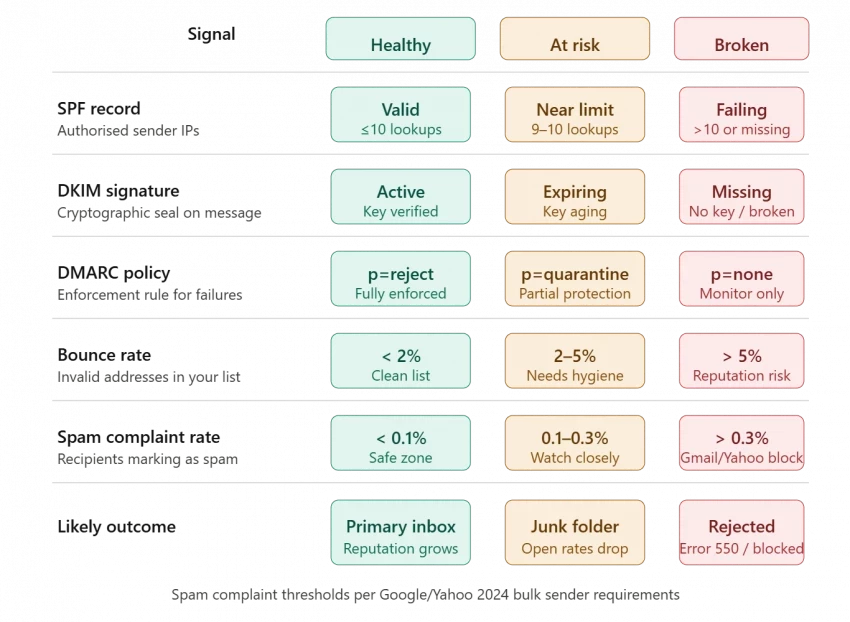
The consequences of non-compliance have evolved from "soft warnings" to "hard rejections."
1. Throttling: Initially, providers may slow down your delivery, which causes time-sensitive emails to arrive hours late.
2. Junk Folder Placement: Messages from unauthenticated domains are now automatically flagged as "untrusted," which leads to an immediate drop in open rates.
3. Hard Rejection (Error 550): Since mid-2025, Microsoft has begun issuing "Access Denied" errors to non-compliant senders. Your emails are not just sent to spam; they are bounced back with a notification that your domain does not meet the required authentication level.
So, people aren't ignoring your emails just because your subject line lacked a "fire" emoji. They’re ignoring them because they either can’t find them in the spam folder or because the email itself felt like more work than it was worth.
Think of your email strategy as a two-part harmony. The technical side (SPF, DKIM, and DMARC) gets you through the front door of the inbox. The human side (clarity, etiquette, and brevity) gets the recipient to actually listen once you're inside. If you ignore the tech, you're invisible. If you ignore the etiquette, you're annoying. Balance both, and you'll find that your response rates don't just recover; they thrive!
Why are my emails going to spam even though they're legitimate?
Authentication (SPF, DKIM, DMARC) is the primary factor. Without it, providers cannot verify your identity, so they default to the spam folder for safety.
Does DMARC improve email deliverability?
Yes. An enforced DMARC policy tells ISPs that you have strict control over your domain, which makes your legitimate emails more likely to hit the primary inbox.
What is a good email open rate?
While 20–25% is a standard benchmark, the best way to improve it is through a mix of technical authentication and concise, action-oriented subject lines.
How do I check my email deliverability?
Use PowerDMARC’s free DMARC Analyzer to check your authentication health, and tools like Google Postmaster Tools to see how your domain reputation is trending.
What is email list hygiene, and why does it matter for email deliverability?
Email list hygiene means regularly removing invalid, inactive, or unengaged addresses from your sending list. High bounce rates signal to inbox providers like Google and Yahoo that you are sending to outdated data, which damages your sender reputation and can trigger filtering or blocking of your future emails.
When I sat down to seriously compare InVideo and Pictory, I wasn’t just testing...
Grace Howard5 months ago

AI background removal has quietly become the “first edit” step for almost every...
Benjamin Clark5 months ago

AI photo enhancement has quietly become the “secret sauce” behind sharp Instagra...
Funke Ogunleye5 months ago

Looking Beyond Canva: What Are You Really Missing?Canva is brilliant for getting...
Grace Howard5 months ago

A few years ago, “chatbot” meant a rigid decision tree that collapsed as soon as...
Benjamin Clark5 months ago

ElevenLabs has set a high bar for lifelike AI voice generation, but it’s no long...
Grace Howard6 months ago
Discussion